Screenshots
On this page you can see two screenshots of PrintMyFonts. The screenshots are available for the operating systems Windows 11, Windows 10, Windows 7, Windows XP, Linux Ubuntu and macOS. You can switch the shown operating system with the links under the screenshots.
The Font Printer
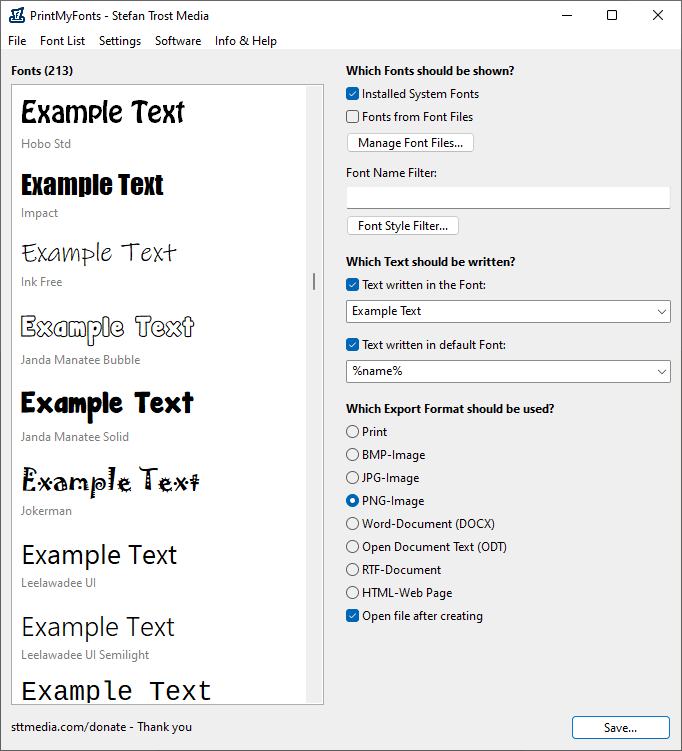
On the left side of the main window, you can see your fonts, on the right side, you can determine which fonts should be displayed, which text should be written and which export format should be used.
Windows 11 - Windows 10 - Windows 7 - Windows XP - Linux Ubuntu - macOS
After you have selected your desired export format, you can click on the button "Export" (or "Print") in order to save as file or print your current font list. In addition to printing, the following export formats are supported: images (PNG, JPG or BMP), Word documents (DOCX), Open Document Text documents (ODT), RTF documents and web pages in HTML format.
Under "Which text should be written", you can define both, text to be written in the corresponding font and/or text that should be outputted in the default font. In the screenshot, we can see the default settings: We are writing the text "Example Text" with using the font and we are writing the name of the font using the default font. You can enter arbitrary sentences, letters, placeholders and other characters here, of course also Unicode characters.
Filter and Font Variants
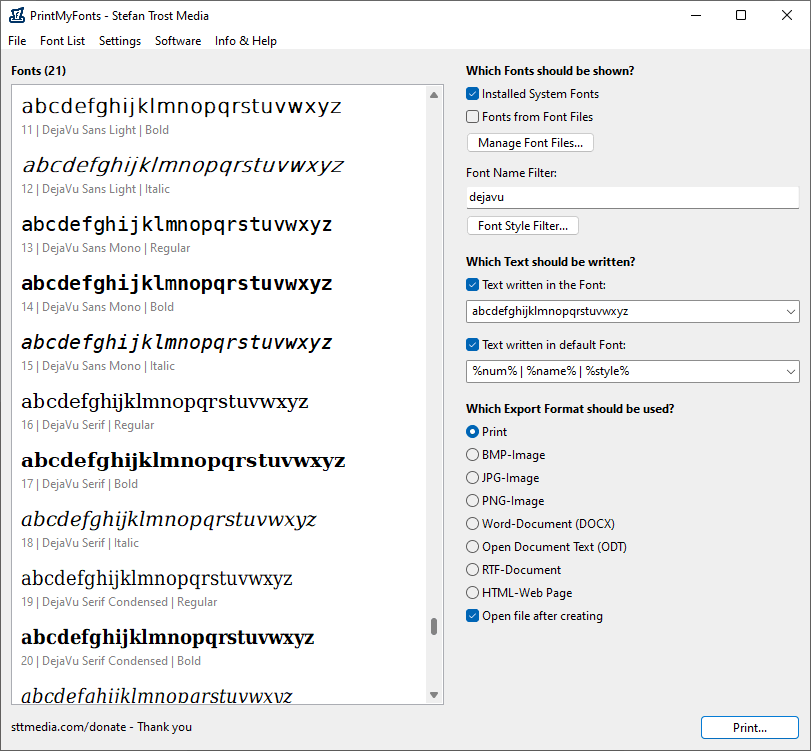
The next screenshot is showing the possibility to compare several font variance with each other, to use filters and to adjust the text.
Windows 11 - Windows 10 - Windows 7 - Windows XP - Linux Ubuntu - macOS
In the settings under "Font Style Filter" you can define the font variants that should be listed. For this screenshot, we have selected the variants Regular, Bold and Italic.
Additionally, we have activated the font name filter to only display a specific selection of fonts ("dejavu"). Multiple search terms can be separated by a comma or semicolon. You can preface a term with a minus sign in order to exclude this word from search.
We have also adjusted the texts for the screenshot. On the one hand, we have written the letters from a to z to be printed in the corresponding font, on the other hand, we are using the placeholders %num% (numbering), %name% (name of font) and %style% (font variant) as a subtitle. The placeholders can be combined with other characters or words like you want and you can use them in both fields (more about placeholders).
Old Screenshots
Screenshots of the old version of PrintMyFonts can be found here.
Note
The screenshots were created with the Clipboard Saver. With this tool, you can automatically save screenshots in any format and you can also simultaneously scale or otherwise edit the graphic according to your wishes.