First Steps
The WordCreator can be used for creating new random words or texts from predefined syllables according to customizable criteria. On this page, you will find an introduction to the functionality of the WordCreator, divided into the following sections:
For an overview of the other components of the software, see the help section. An explanation of all functions in detail you can get on the page functions.
Your first Word
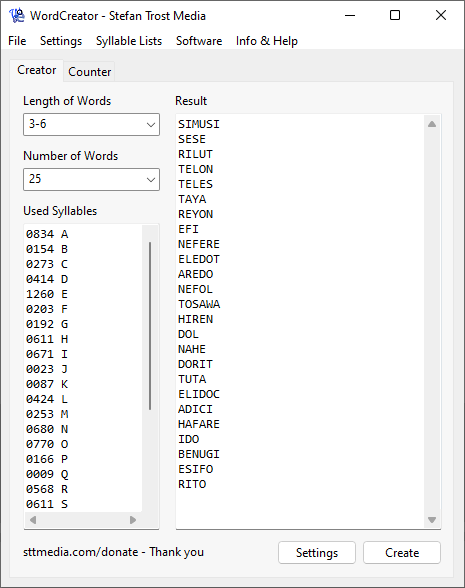
After starting the application, just click on "Create" (CTRL+N) on the bottom side of the main window. After that the created words will appear in the box on the right side.
Windows 11 - Windows 10 - Windows 7 - Linux Ubuntu - macOS
If you immediately click on "Create" after starting the tool, the standard settings will be applied. This means that six readable words are made of 3-6 syllables using frequencies from the English language. Of course, you can also change these settings.
Your created words can then be copied to the clipboard or you can save them as a text file (TXT), Word document (DOCX), Open Document Text (ODT) or RTF by right-clicking on the result field. Alternatively, you can also use the keyboard shortcuts Shift+CTRL+C and CTRL+S for this.
Length and Number of Words
The heart of the WordCenerator is the syllable list at the bottom left of the main window. This box always contains the syllables that are currently used to create the words.
In the upper left of the main window, you can adjust the length and the number of words created simultaneously. With both settings, you can directly choose values from the list or you can type your own value freely.
The length always refers to the number of used syllables. That means that if you are using syllables consisting of more than one character, the length defined here would probably not match the character length of the created words.
If you would like to create words with a random length, you can simply define a range of numbers instead of a single number. For example, when writing "3-6", words with a minimum length of 3 syllables and a maximum length of 6 syllables will be created.
Used Syllables
Each line is standing for one syllable. Within a line, first of all, a number is indicating the frequency of the syllable, then there is a space and after that an arbitrary syllable consisting of arbitrary characters. The numbers are analyzed relative to each other so that the sum or length of the number does not matter. As an example, when using "2 A", "4 B" as a syllable list, this means, that B will appear twice often as A in the created words.
You can find some predefined lists with frequency profiles from different languages in the menu "Syllable Lists". From there, it is also possible to create random lists. Otherwise, it is also possible to create or adjust arbitrary lists by hand. If you want to use a list of syllables without frequencies, you can also copy these into the text box and assign frequencies of your choice with clicking the right mouse button.
On the page about syllable lists, you can learn more about the usage and creation of syllable lists and how to use more complicated lists, for example, with positioning.
Settings
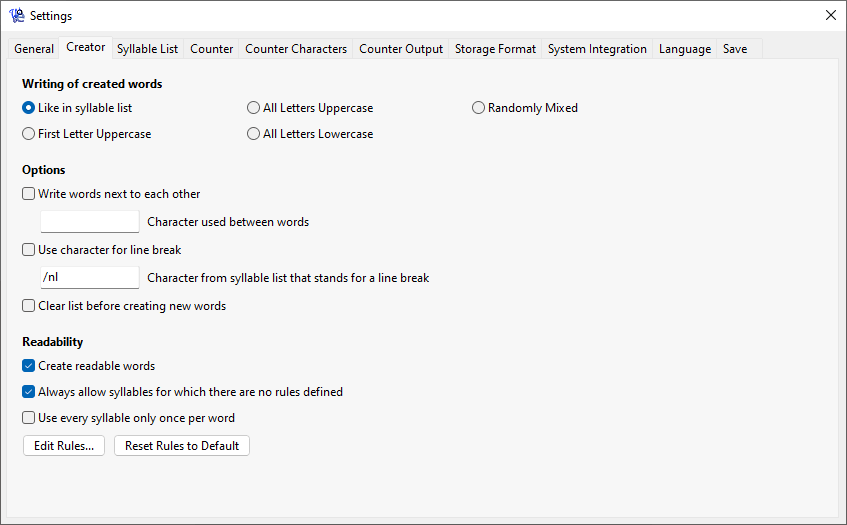
You will find more settings after clicking on the button "Settings". In the following, you can see a screenshot of the window.
Windows 11 - Windows 10 - Windows 7 - macOS
Among other things, it is possible to determine the writing of the words, you can choose whether the words should be written next to each other or among each other and you can set that only readable words should be created. In the next section, you will learn more about the readability, the other functions and options of the settings are explained on the page functions in detail.
Readable Words
Activate the option "Create readable words" to ensure that the WordCreator is only creating readable words. In the pre-settings this means that, for example, after a B the letters A, E, I, O and U are allowed, but not K, L, M or P.
However, you can also create your own rules by clicking on "Edit Rules". On the page about readable words, you can read a detailed explanation of how to define own rules.